
Furniture Recolor Mod 1.5.6
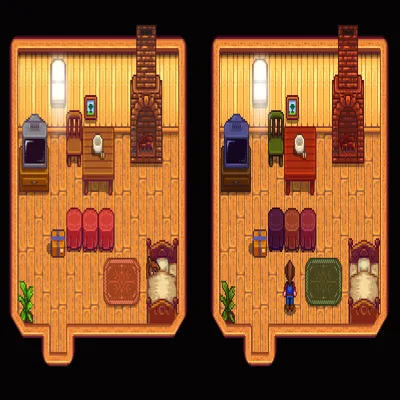
MODFurniture Recolor allows users to tint individual furniture pieces and wall-hangings within the game. The mod operates using R, G, and B hotkeys to modify the color tint. To apply a tint, players hover over a furniture item and press a hotkey to increase the corresponding red, green, or blue value. Holding a modifier key, which defaults to Left Alt, decreases the tint instead. Tinting is tied to the furniture's placement, meaning that moving or removing a piece of furniture will reset its custom tint.
Furniture Recolor allows users to tint individual furniture pieces and wall-hangings within the game. The mod operates using R, G, and B hotkeys to modify the color tint. To apply a tint, players hover over a furniture item and press a hotkey to increase the corresponding red, green, or blue value. Holding a modifier key, which defaults to Left Alt, decreases the tint instead. Tinting is tied to the furniture's placement, meaning that moving or removing a piece of furniture will reset its custom tint.
The default hotkeys for increasing tint are NumPad 1 for Red, NumPad 7 for Green, and NumPad 9 for Blue, with NumPad 3 designated for resetting the tint. All configuration variables for Furniture Recolor can be adjusted either through the Generic Mod Config Menu or by directly editing the config.json file. This mod requires SDV 1.5.5+ and SMAPI, and it uses Harmony for its functionality.